Aurora FREE
A mesmerizing northern lights background with procedural noise and flowing colors.
Overview
A mesmerizing northern lights background with procedural noise and flowing colors.
- Procedural simplex noise generation
- Customizable base color and variation
- Adjustable speed and intensity
- Performant off-screen rendering
- Transparent background support
Aurora
Bring the magic of the northern lights to your website. Aurora generates a flowing, organic curtain of light using procedural noise, creating a soothing and premium background effect that never repeats.
Features
Organic Flow The light rays move naturally, simulating the unpredictable yet rhythmic dance of real aurora borealis.
Color Customization Start with a base color and control the hue variation to create green, purple, or any other colored aurora effects.
Performance Focused Uses off-screen canvas rendering and optimized transparency handling to ensure smooth performance without blocking the main thread.
Use Cases
Hero Backgrounds — Create an immersive, dreamy first impression.
Landing Pages — Add visual interest without distracting from your content.
Portfolio Sites — Showcase a modern, artistic aesthetic.
SaaS Products — Create a premium, polished feel for your app.
How to Use
Installation
VIDEO PLACEHOLDER: Installation Tutorial
- Log in to your account at framerhub.io
- Navigate to framerhub.io/dashboard
- Find Aurora in your Recent Purchases
- Click the "Copy" button
- Open your Framer project
- Paste the component anywhere on your canvas (Cmd/Ctrl + V)
Customization
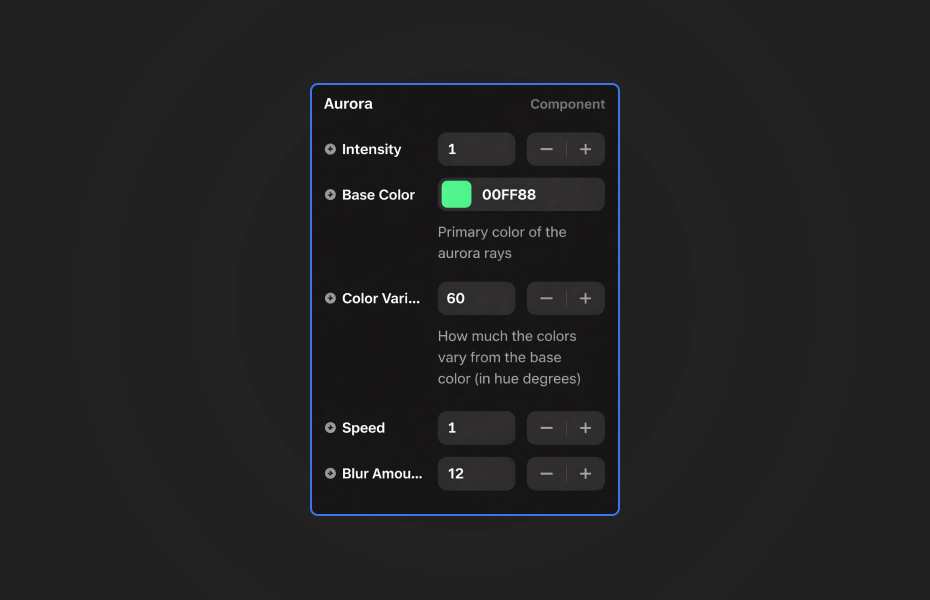
Customize the appearance and behavior using Framer's property controls.
Intensity
- Controls the density of aurora rays (0.1 to 2)
Base Color
- Primary color of the aurora rays
Color Variation
- How much the colors vary from the base color (0-180 degrees)
Speed
- Animation speed of the flowing rays
Blur Amount
- Glow intensity and softness
Quick Tips
Best Performance — Keep intensity at 1 or below for smooth animation on most devices.
Color Combinations — Green with 60° variation gives classic aurora look. Try purple or cyan for different moods.
Layering — Place content above the component. Use contrasting text colors for readability.
Speed Settings — Slower speeds (0.5-0.8) feel more elegant and hypnotic.
License
Free Component — Use freely in personal and commercial projects.
Refund Policy
Due to the nature of our digital products, we are unable to offer refunds, but we're here to assist you with any questions or concerns!
Credits
Ambient Canvas Backgrounds by Sean Free for Codrops.
Aurora - FREE
A mesmerizing northern lights background with procedural noise and flowing colors.
You might also like
Why Choose Framer Hub Components
Loved by Framer teams
Used by Framer professionals who need premium, no-code experiences.
"The Best Framer CMS Filtering Plugin I've Found — Truly a Game-Changer. I've tested a lot of Framer CMS filtering and sorting components — both free and paid — and this is by far the best one I've come across."
"He really helped me out when I needed assistance adding it to my Framer project. Super fast customer support highly recommend!"
"We had tried a couple of other Framer CMS filter components but they were buggy, hard to use and support was slow or non-existent. FramerCMSFilter is easier to use and has a lot of added functionality."
Got questions? We've the answers
Got questions? We've the answers
Everything you need to know about FramerHub.